Title here
Summary here
Research in materials science produces large and varied sets of data: descriptions of samples, machines and processes, measurements, images, simulation outputs… To be reusable, this data has to be stored in an organized way, linked to its context, and easy to find and download.
The DIAMOND Project provides a data platform that serves as a foundation for data engineering in research: it enables projects to upload, structure, retrieve, and analyze heterogeneous data (experiments and simulations, raw files, and manually entered data) without requiring database expertise. This page explains how to use this data platform to upload your data and design a database tailored to your DIADEM project.
To meet the requirements of the DIAMOND Project and the PEPR DIADEM, a common software architecture has been proposed for all partners. This architecture is divided into three distinct sections:
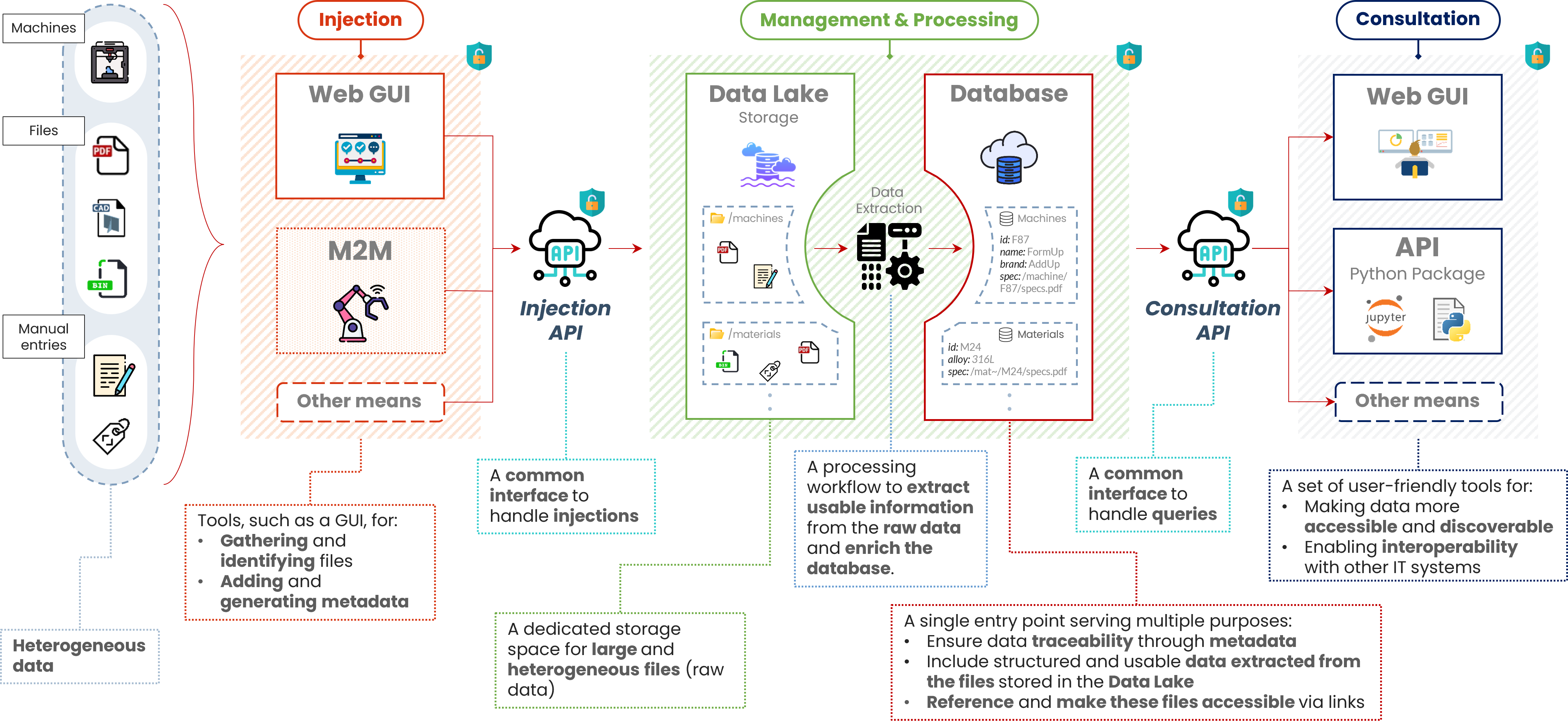
Database architecture
(In construction)
(In construction)
This section explains what you need to prepare, and how we work together, to get your own database hosted on the DIAMOND-DM platform.
Our databases are built on MongoDB, a NoSQL database. In practice, this means:
This flexibility is what lets us adapt the database to your own data (samples, machines, experiments, characterizations, …). Two key notions are used throughout the process:
| Term | Meaning | Learn more |
|---|---|---|
| Collection | A group of related documents. Roughly equivalent to a “table” in SQL (e.g. MACHINE, SPECIMEN). | MongoDB manual: Collections |
| Attribute | A property of a document (a field in MongoDB terminology), e.g. Manufacturer or Porosity Rate. | MongoDB manual: Documents and fields |
The overall architecture is described in Section 1.
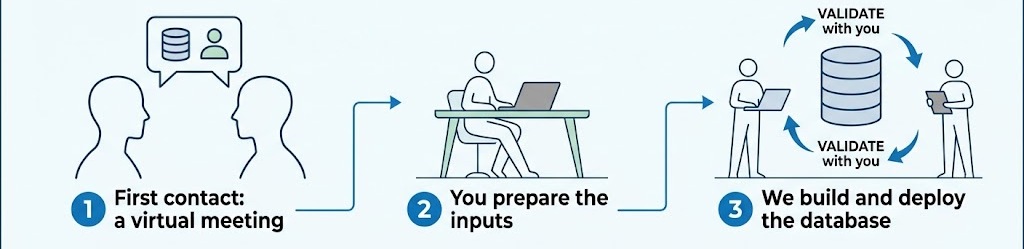
User iteration
| # | Input | Mandatory? | Description |
|---|---|---|---|
| 1 | Data model | Yes | An Excel file following a specific template describing the “shape” of your database. |
| 2 | Example data files | Yes | A set of typical files that users will upload. |
| 3 | Extraction algorithm | Only if some attributes are extracted from files | A script showing how to read uploaded files and compute/extract relevant data. |
The data model defines what will be stored in the database and how the pieces relate to each other. It has to be written in a specific Excel template file in which you define:
You can download this template just here: Data Model Template (Excel)
This file also includes the explained example described below, so you can see how each column is used.
Have a look before our first meeting, and fill it after our discussion. Then, send it back to us for review.
The template contains a complete, explained example (here for an
additive-manufacturing database). Open the .xlsx file and follow the
explanations it contains: each row describes one attribute of
one collection, and the example shows how to fill in every column.
The collections of this example (BUILD, MACHINE, MATERIAL BATCH,
SPECIFICATION, COMPUTER AIDED MANUFACTURING, COMPUTER AIDED DESIGN,
PLATE, SPECIMEN, CHARACTERIZATION) are linked together as follows:
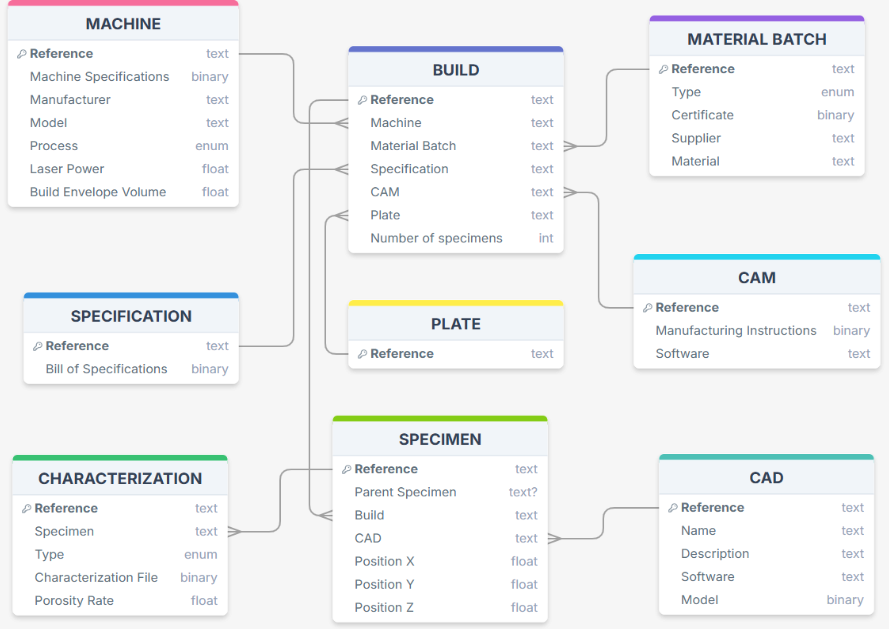
Relationships between the collections of the example
| Column | What to write |
|---|---|
| Collection | Name of the collection the attribute belongs to. |
| Attribute | Name of the attribute (property) within the collection. Use it as information that users can later filter on when searching the database. |
| Capacity | Estimated maximum number of elements associated with the attribute (1 for a single value, a larger number (or n when this number is unknown) if the attribute holds a list). |
| Type | Data type of the attribute (see available types). |
| Required | true if the attribute must be filled in at upload, false otherwise. |
| Unit | Optional unit of the attribute (e.g. mm, W, %). |
| Extension | For attributes of type file: list of accepted file extensions (e.g. pdf; docx; txt). |
| Related to | Name of the collection the attribute refers to (see Relationships). |
| Extracted from | Name of the file/image attribute from which the value is automatically extracted (see
Extracted attributes). |
| ConstraintType | Type of constraint applied to the values (see constraints). |
| ConstraintValues | Bounds or set of allowed values for the constraint. |
| Description | Free-text description of the attribute. |
| Available types | Booleans | Constraint types | Cardinality |
|---|---|---|---|
boolean | true | <= | one |
datetime | false | >= | list |
dict | < | ||
email | > | ||
enum | [ ] | ||
file | [ [ | ||
float | ] ] | ||
image | ] [ | ||
int | in | ||
long | |||
reference | |||
str | |||
url |
The Related to column defines the links between collections (similar to foreign keys / pointers).
reference, Related to must be filled and
it must contain the target collection name.str acting as an identifier of a document in
another collection (or in the same collection, e.g. a hierarchical link
like Parent Specimen in SPECIMEN), also fill in the targeted collection.Example: the attribute Machine of BUILD has type reference and is
related to MACHINE.
Some values should not be typed in by users, because they can be read or computed from an uploaded file. These are described with the Extracted from column.
file or image
(e.g. a .csv, .xy, .jpg, .raw file).Example: Porosity Rate in CHARACTERIZATION is extracted from
CHARACTERIZATION/X-ray CT-scan; Laser Power in MACHINE is extracted
from MACHINE/Machine Specifications.
Constraints (ConstraintType + ConstraintValues) restrict the values accepted for an attribute.
int, float, …) or enumerations (enum).file attributes or on reference attributes.(0; 100), not
("0"; "100")).[ ] closed interval, ] [ open interval, [ [ and
] ] half-open intervals.in is used for a list of allowed values (e.g. ("Wire"; "Powder")).| Example | Constraint type | Values | Meaning |
|---|---|---|---|
MACHINE / Process | in | ("WAAM"; "LPBF") | Only these two values are accepted. |
MACHINE / Laser Power | [ ] | (100; 10000) | Value between 100 and 10000 (included). |
BUILD / Number of specimens | > | 0 | Strictly positive number. |
CHARACTERIZATION / Porosity Rate | [ ] | (0; 100) | Percentage between 0 and 100. |
Tip: for a true/false property, use the
booleantype without constraint. Do not use0/1values with a boolean.
Users who inject data into the database will upload files (specifications,
machine data, 3D models, tomography images, …). These files are stored in
the data lake and can be
downloaded by the users who consult the database.
Attributes of type file or image in your data model are the ones that
receive these uploads.
You can send us as many files as you want to populate the database at creation time, but we need at least a couple of typical example files for each kind of file that will be uploaded. They allow us to test and validate the database and the extraction algorithm.
Typical examples (from the additive-manufacturing example):
| Associated attribute | Example file name |
|---|---|
| Machine Specifications | wlam_machine.pdf |
| Certificate | certificat_316L.pdf |
| Bill of specifications | cahier_des_charges.pdf |
| Manufacturing Instructions | plateau.gcode |
| Model | cube.stp |
| X-ray CT-scan | tomography.raw |
If some attributes are extracted from uploaded files (column Extracted from), we need an algorithm showing how to:
This is typically a short script (e.g. in Python) that takes a file as input and returns the values of the attributes. The raw files remain available for download, while the extracted values are stored in the database and can be used to search and filter the data.
Example: a script that opens the file uploaded in Machine Specifications
(e.g. wlam_machine.pdf), finds the manufacturer, the model and the maximum
laser power, and returns them as the values of the attributes Manufacturer,
Model and Laser Power of the MACHINE collection. The user only uploads
the file; the three values are filled in automatically.
The same logic applies to values stored in file metadata (e.g. dates, instrument settings, image dimensions) or computed from the file content.
If your data model has no Extracted from attributes, you do not need this
step.
Before our first meeting, it helps to have thought about:
You can contact us through the general form: Contact form.
You can also reach directly the person in charge of data management, access to the database, the data model and the ontologies:
| Topic | Contact |
|---|---|
| Coordination | thierry.deutsch@cea.fr |
| Development of the database platform | imanol.setoain@cea.fr |
| Ontologies | cinthya.herreracontreras@cea.fr |